Facility Work Order Automation: What CMMS Software Doesn’t Fix
A CMMS logs a work order the moment it’s submitted. It doesn’t call the vendor to confirm, chase the one that went quiet for three days, or tell the tenant what’s happening. Here’s what actually closes that gap, and what should stay with your coordinator.
Quick Answer
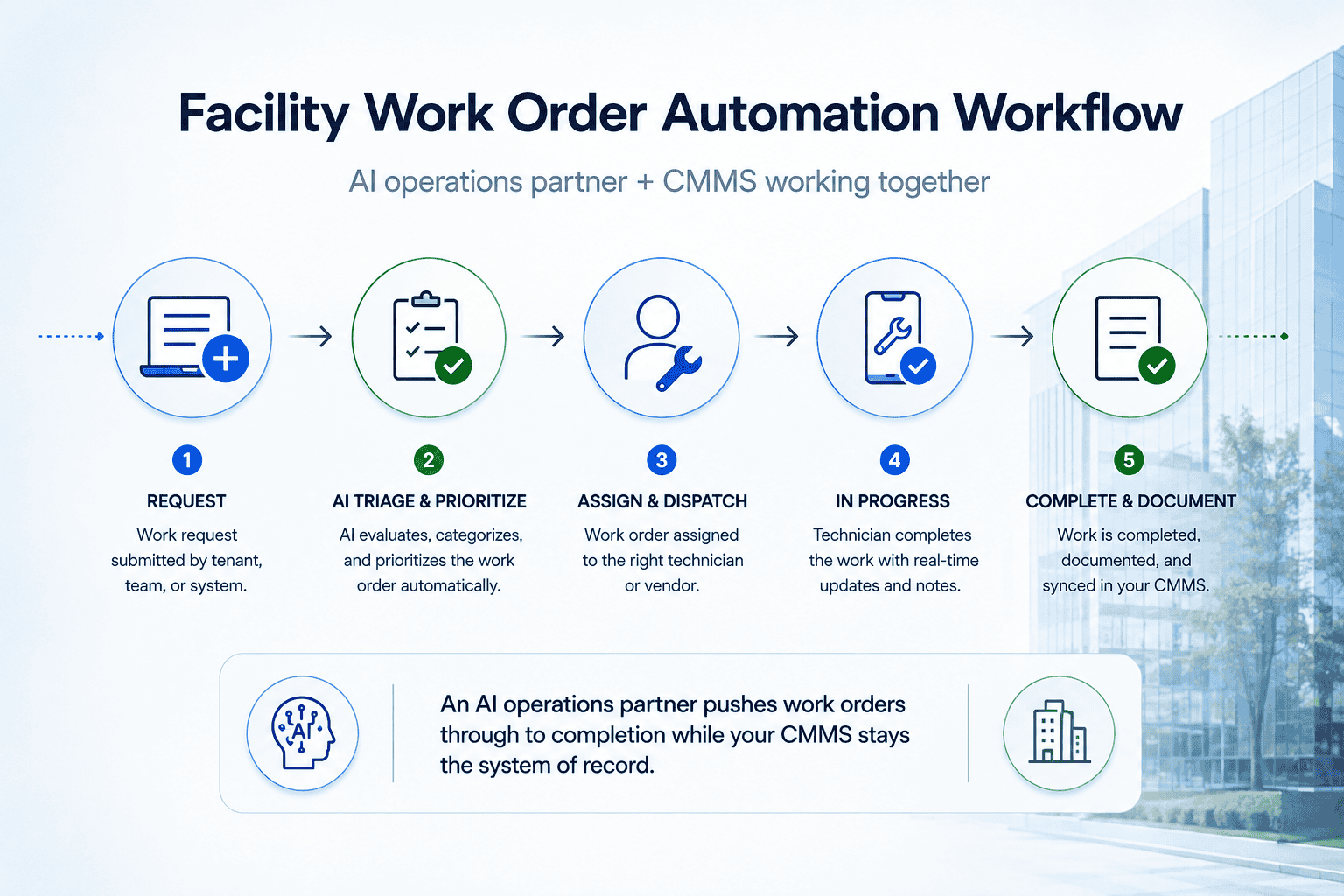
Facility work order automation uses an AI-driven system, not just another dashboard, to consolidate requests from calls, email, portals, and texts, route them to the right vendor by skill and zone, chase confirmation until the job is scheduled, push status updates to tenants and property managers, and capture closeout documentation. It runs inside the CMMS you already have, not instead of it.
Related: our property management CRM setup.
Who This Guide Is For
- Facility and property management coordinators
- Ops leaders evaluating work order or CMMS software
- Teams buried in vendor email and status-update requests
- Portfolios where tickets sit at “open” too long
Key Takeaways
Vendor confirmation, status updates, and closeout capture can run without a coordinator driving every step.
Vendor contract issues, SLA disputes, and true emergencies still get routed to a person.
The system connects to the platform you already run instead of asking you to switch tools.
Whether intake, vendor chasing, or status updates are costing you the most time determines what gets built first.
A tenant submits a work order through the portal at 4:45pm on a Friday, a leaking pipe under a sink. The CMMS logs it, status: open, assigned to a plumbing vendor. Nobody calls the vendor to confirm they got it. Monday morning the tenant calls furious, and the coordinator is now doing damage control instead of working through the other forty open tickets in the queue.
That’s not a software problem. The ticket was logged correctly, right on schedule. It’s an execution problem, and it’s why portfolios with a perfectly good CMMS still have coordinators drowning in vendor email and angry status-check calls.
What Facility Maintenance Software (CMMS) Actually Does
Search “facility maintenance software” or “work order software” and you’ll land on MaintainX, Limble, UpKeep, eMaint, Coast, or a dozen similar platforms. They’re solid products, and if you don’t have one, get one. They give you:
- A structured log of every asset and work order
- Preventive maintenance scheduling
- Ticket status tracking from open to closed
- Reporting on SLA compliance and recurring issues
- A single system of record across a portfolio
What they don’t do is call the vendor to confirm a ticket was received, notice when a “scheduled” job has gone quiet for three days, or tell the tenant anything before they call to complain. That work still falls on a coordinator, working an inbox and a phone between everything else on their plate.
The Part Software Was Never Built to Solve
Every team that’s shopped for work order management software eventually runs into the same wall: the tool is a system of record, not a system of action. Four gaps show up over and over.
Assignment isn’t the same as action. A ticket routed to a vendor in the CMMS doesn’t mean the vendor has confirmed, scheduled, or even seen it. Someone still has to check.
Vendor confirmations get lost in email. “I’ll get to it” sent to an inbox rarely becomes a scheduled visit without a follow-up nudge, and usually more than one.
Tenants and property managers hear nothing until they complain. No proactive update means the first communication is often a tenant calling angry, which turns a routine ticket into a relationship problem.
Closeout documentation is inconsistent. Photos, final cost, and completion notes depend on whether anyone chased the vendor for them after the job was done, and that’s rarely a priority once the ticket looks “closed.”
- Vendor contract terms and pricing negotiations
- SLA disputes and escalations to ownership
- True emergencies requiring on-the-spot judgment
- Sensitive tenant relationship issues
The Other Fix Teams Try: Hire More, or Add a Dispatcher
Most teams solve this one of two ways before they solve it for good.
Hire another coordinator. It works until it doesn’t, coverage gaps on nights, weekends, and sick days reset institutional vendor knowledge every time someone new starts.
Add a generic answering or dispatch service. Calls get picked up, which helps. But a generic service doesn’t know your vendor’s skills, zones, or availability, and it still doesn’t chase confirmation or close the loop on documentation, it just moves the bottleneck one step downstream.
Both fixes patch the symptom. Neither one closes the loop from ticket submitted to ticket actually resolved.
What an AI Operations Partner Does Instead
A CMMS vendor sells you a tool and a login. A dispatch service sells you a person answering a phone. An AI operations partner takes the work order process itself and runs it, inside the CMMS you already have. RevUp Now AI doesn’t ask a team to switch platforms; the system sits on top of whatever you already run.
| CMMS Software | Generic Answering/Dispatch | AI Operations Partner | |
|---|---|---|---|
| Consolidates intake from calls, email, portal, text | No | Partially | Yes |
| Routes by vendor skill, zone, and availability | Manual | No | Yes |
| Chases vendor confirmation automatically | No | No | Yes |
| Sends proactive status updates to tenants/PMs | No | No | Yes |
| Captures closeout documentation automatically | No | No | Yes |
| Works inside your existing CMMS | N/A | No | Yes |
| Requires staff to operate day-to-day | Yes | No | No |
One caveat worth being direct about: the AI agent that answers calls or texts is one piece of this, not the whole thing. Some teams need intake consolidation most, too many channels, nothing centralized. Others have intake under control but bleed hours chasing vendors, or lose tenant trust to silence. The build reflects whichever of those is actually costing your team the most time.
How RevUp Now AI Builds the System
Consult
A working session on where tickets stall, intake channels, vendor follow-up, status communication, or closeout documentation.
Build
The system is built around your vendor list, zones, escalation rules, and SLA tiers, connected to the CMMS you already use.
Implement
A supervised go-live, usually starting with one ticket category or building, with test runs reviewed before full rollout.
Maintain
Ongoing monitoring on a flat monthly retainer, adjusting routing rules and catching the next bottleneck.
Pricing is flat: one build fee, one monthly retainer, no per-ticket metering, and no contract lock-in. Most teams have something live in about 30 days. Learn more about the broader RevUp Now AI process.
Work Order Checklist: What to Capture on Every Ticket
Whether a person or a system is running intake, every work order, from submission to closeout, should capture the same core information:
- Location and zone: building, unit, or area affected
- Category: plumbing, HVAC, electrical, general, or other trade
- Urgency and SLA tier: emergency vs. routine, with the response window that applies
- Vendor assignment and confirmation status: assigned, confirmed, scheduled, or still pending
- Requester contact and preferred update method: tenant, property manager, or internal staff
- Closeout documentation: completion photos, final cost, and notes
- Recurrence flag: whether this is a repeat issue worth escalating beyond a one-off fix
A missing item here isn’t just a data gap, it’s usually the reason a ticket sits at “open” for a week, or the reason a recurring issue never gets flagged until it becomes an expensive repair.
Common Myths About Work Order Automation
Myth: AI replaces your CMMS
Not in this model. The system is built to integrate with the CMMS you already run, not swap it out.
Myth: Vendors won’t respond to automated follow-up
Consistent, scheduled nudges outperform manual chasing because they’re reliable, not because they’re different in tone.
Myth: Tenants will be upset getting automated updates
Most tenants care more about getting any status update at all than what generated it.
Myth: Only large portfolios benefit
Fit is about ticket volume against coordinator bandwidth, not the size of the portfolio.
Related RevUp Now AI Resources
Ready to Get Work Orders Closed, Not Just Logged?
See how RevUp Now AI can run intake, vendor chasing, status updates, or closeout documentation, inside the CMMS you already use.
Related RevUp Now AI Resources
Frequently Asked Questions
Does this replace our CMMS?
No. It’s built to integrate with the CMMS you already run and pushes work order data into your existing system, no double entry, no new login for your team.
How does vendor routing work?
The system is built around your actual vendor list, their trades, zones, and availability, so tickets route the way your coordinator would route them, consistently, every time.
What happens with true emergencies?
Emergencies are identified by triage rules and routed to on-call staff immediately. Judgment calls and escalations stay with your team.
Will tenants or property managers know they’re dealing with AI?
It discloses if asked directly. In practice, people tend to notice they got an update at all, not what generated it.
What happens to work order data?
It routes straight into your existing CMMS or property management system, with no manual re-entry step where information could get lost.
We only handle a modest ticket volume, is this overkill?
If tickets sit at “open” because nobody had time to chase a vendor, or a tenant has ever had to call twice for a status update, the fit is about bandwidth, not volume.