
Contractor Estimating Software vs. Automated Estimating: What’s Actually Different
Every contractor estimating tool on the market promises faster bids. Almost none of them touch the part that’s actually costing you money: getting accurate numbers out of your head, your subs, and your supplier price sheets in the first place. Here’s the real difference between buying software and having your estimating process automated for you.
Quick Answer
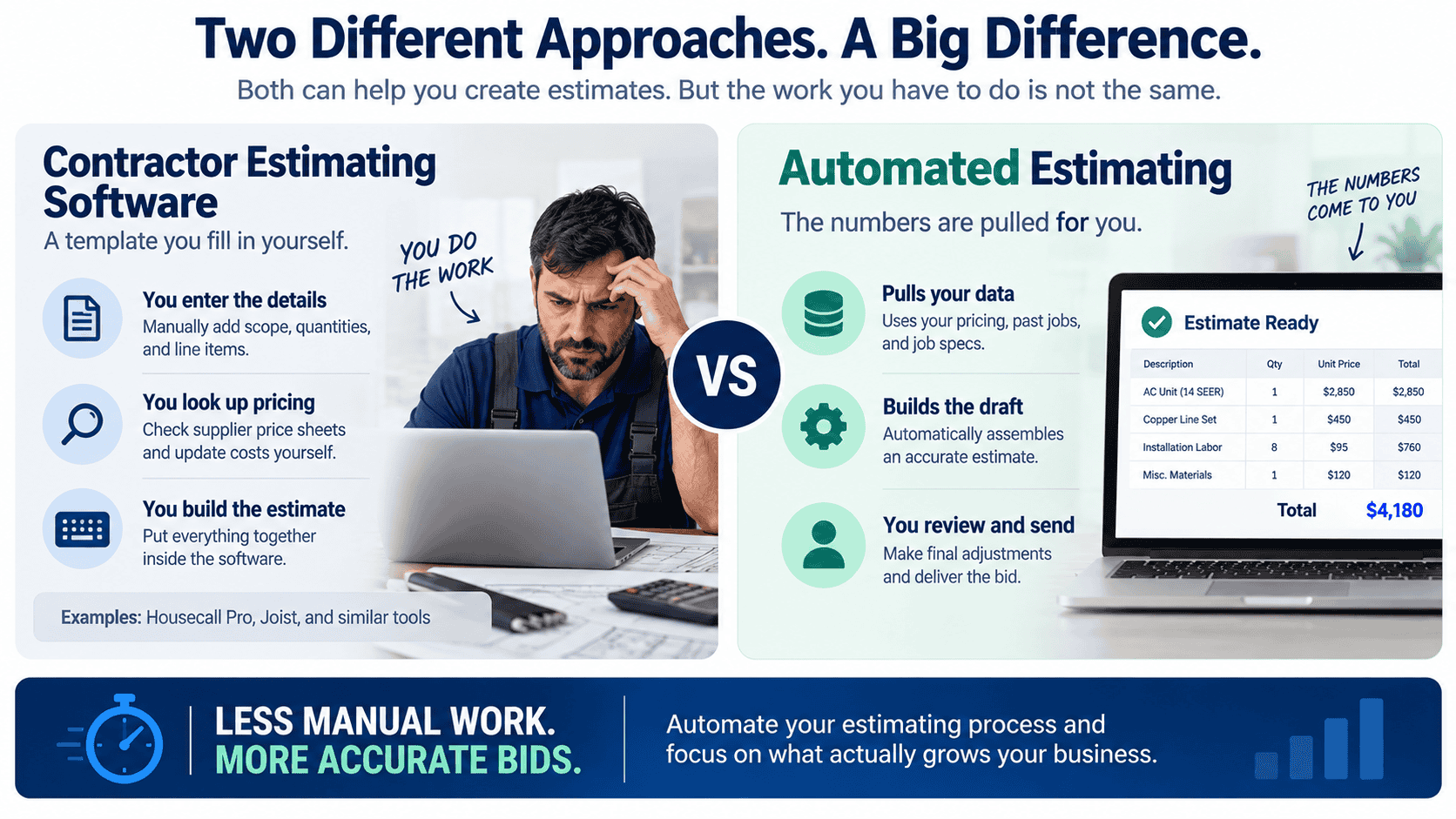
Contractor estimating software (Housecall Pro, Joist, and similar tools) gives you a template to fill in yourself, you still gather the numbers, chase supplier pricing, and build the bid by hand inside their interface. A done-for-you automated build connects to where your pricing, past jobs, and job specs already live and assembles the draft estimate for you, so someone on your team reviews and sends instead of building from scratch.
Who This Is For
Owners and estimators at HVAC, electrical, plumbing, roofing, and general construction companies who are bidding 15+ jobs a month, losing bids to slower turnaround, or watching margin disappear because a labor line or material cost got missed under deadline pressure.
The real bottleneck isn’t the estimate template
Ask most contractors why bids take so long and they’ll point to the estimate itself, too many line items, too much math. That’s rarely the actual holdup. The holdup is everything before the math: pulling the job specs from an email thread, checking whether the material pricing you used last month is still current, tracking down a sub for a quote on the scope you don’t self-perform, and reconstructing what a similar job actually cost you last time because nobody wrote it down anywhere searchable.
A blank estimate template doesn’t solve any of that. It just gives you a nicer place to type in numbers you still have to go find yourself.
Related: lead follow-up automation for open quotes and CRM automation.
What contractor estimating software actually does
Tools like Housecall Pro and Joist are genuinely useful for what they’re built for: a clean digital template, a client-facing proposal layout, e-signature, and a line-item catalog you build out over time. They replace the whiteboard-and-spreadsheet era, and that’s real progress for a lot of shops.
But they’re still DIY. You or your estimator log in, manually enter the scope, manually check pricing against whatever’s current, manually pull historical job data if you happen to have kept it somewhere, and manually send the finished bid. The software holds the structure. You still do the work of filling it.
What an automated estimating build does differently
An automated estimating system is built around your business specifically, it’s not a template you configure, it’s a workflow that runs. Estimating automation is one example of what that might look like: job specs come in, current material and labor pricing gets pulled automatically from your supplier feeds or price book, past comparable jobs surface for reference, and a draft bid assembles itself for your estimator to review, adjust, and send. Your team spends its time on judgment calls, margin, risk, scope questions, instead of data entry.
The exact shape of the build depends entirely on how your estimating process actually works today. A roofing company juggling storm-damage volume needs something different than an electrical contractor bidding commercial tenant improvements. That’s the point of a diagnose-then-build approach instead of a one-size-fits-all subscription: the system gets shaped around your business, not the other way around.
Side-by-Side Comparison
| Estimating Software | Automated Estimating Build | |
|---|---|---|
| Who enters the data | You or your estimator, by hand | Pulled automatically from your existing sources |
| Pricing accuracy | As current as the last manual update | Reflects live supplier/price-book data |
| Historical job reference | Only if someone saved it and can find it | Surfaced automatically for comparable jobs |
| Setup | You configure templates and catalogs yourself | Built and implemented around your process |
| Who maintains it | You, indefinitely | Maintained on an ongoing basis as your business changes |
| Relationship model | Monthly software subscription | Flat build fee plus flat monthly retainer |
What this looks like across different trades
The underlying problem is the same everywhere, slow, manual, error-prone bid assembly, but the specifics differ by trade:
Equipment and duct pricing pulled automatically instead of an estimator calling the distributor for a quote on every job.
Panel schedules and fixture counts referenced against past comparable jobs instead of rebuilding labor estimates from scratch.
Material takeoffs and current shingle/underlayment pricing tied directly into the bid during high-volume storm season.
Sub quotes and change-order history surfaced automatically when a similar scope comes up again.
If you’ve already read our piece on electrical estimating automation, this is the broader version of that same problem, it shows up nearly identically across every trade that bids project work.
Myths worth clearing up
“This is just another AI tool I have to learn.”
No login, no dashboard to babysit. This is built into how your estimating already happens, implemented and maintained by a team, not software you’re handed and left to configure.
“It’ll replace my estimator’s judgment.”
It removes the data-gathering grind, not the decision-making. Your estimator still reviews, adjusts, and owns every bid that goes out, they just start from a filled-in draft instead of a blank one.
“We’re too small for something custom-built.”
Scope is sized to what your business actually needs. A five-person shop and a fifty-person shop don’t get the same build, that’s the difference between a subscription tier and a system built around your specific volume.
“Switching from our current software will be disruptive.”
The build connects to what you’re already using where possible, the goal is removing manual steps around your existing tools, not ripping them out and starting over.
Related RevUp Now AI Resources
See What This Looks Like for Your Bidding Process
Every trade bids differently. Let’s talk through how your estimates actually get built today and where the real time is going.
Talk to RevUp Now AIFAQ
Is automated estimating the same thing as AI-generated bids?
No. The system pulls accurate pricing and job data together so a person can build and send the bid faster, it doesn’t generate a final number without a human reviewing it.
Do I still need estimating software if I automate the process?
Sometimes yes, sometimes it replaces the need entirely, it depends on what you’re already using and where the actual bottleneck is. That gets figured out in a consult, not assumed upfront.
How long does it take to get an automated estimating workflow running?
It depends on scope and how your current pricing and job data are organized, but most builds go from consult to live in about a month.
What’s the pricing model?
A flat build fee plus a flat monthly retainer, month-to-month with no lock-in, not a per-seat software subscription.
Does this work if my estimating process is still mostly on paper or in spreadsheets?
Yes, that’s actually one of the more common starting points. The build is designed around wherever your data currently lives.