
Prior Authorization Automation for Medical Practices: What Actually Changes
Prior authorization backlogs can consume an entire role. Here is how AI can handle the repetitive parts of the workflow while keeping clinical judgment, appeals, denials, and payer escalations with your staff.
Quick Answer
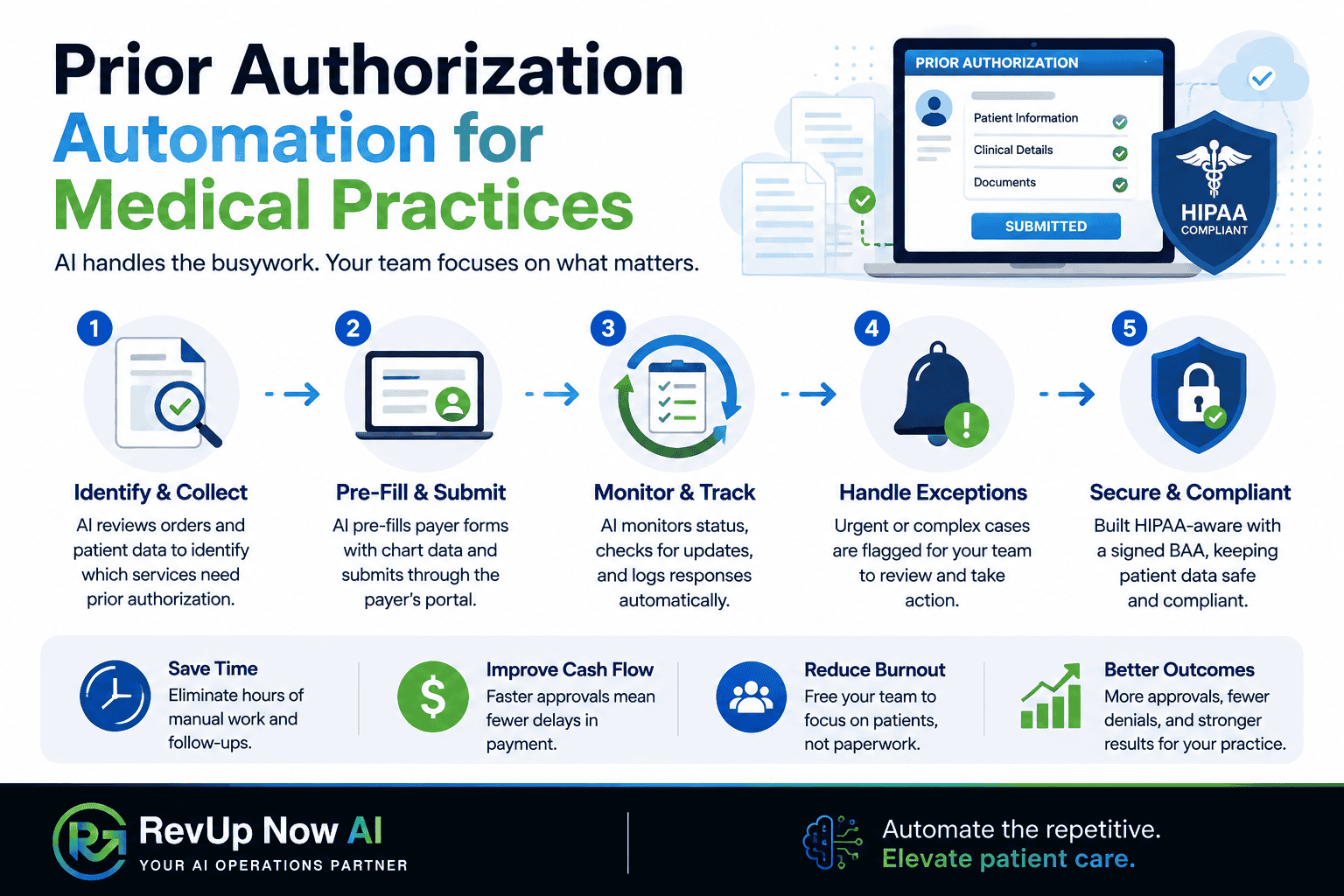
Prior authorization automation uses AI to identify orders that need payer approval, pre-fill forms from the patient chart, submit information through payer portals, and monitor status. It reduces repetitive work without removing human review from denials, appeals, clinical decisions, or payer escalations.
Who This Guide Is For
- Medical practice owners and administrators
- Front-desk and prior authorization teams
- Healthcare operations leaders
- Practices evaluating AI for intake and back-office work
Key Takeaways
Identification, form pre-fill, submission, and status checks can move faster with automation.
Clinical judgment, denials, appeals, and payer escalations stay with your staff.
The workflow should connect with your EHR and practice management system rather than replace them.
The same managed system can support patient intake, scheduling, reminders, and phone queues.
If prior authorizations are eating up a full-time role at your practice, the problem may not be staffing alone. The workflow itself is repetitive, fragmented, and deadline-driven. As a result, work keeps accumulating even when your team is capable and committed.
This guide explains what changes when the repetitive steps become automated, what remains with your staff, and how a human-in-the-loop model can keep the process practical.
What Prior Authorization Automation Actually Does
Prior authorization work is a strong candidate for automation because much of it follows rules. However, the system still needs to reflect each payer’s real process rather than force every case into one generic workflow.
Done well, the system can:
- Flag orders that require prior authorization before they become a problem.
- Pull relevant information from the patient chart and pre-fill payer forms.
- Submit information through each payer’s portal.
- Check status according to the payer’s own timeline.
- Surface exceptions that need a human immediately.
Why the Backlog Becomes Someone’s Whole Job
Prior authorization teams rarely deal with one clean queue. Instead, new referrals, urgent requests, payer follow-ups, missing information, and portal checks all compete for attention at the same time.
For example, two pending authorizations may reach a payer’s follow-up window on the same day that a new referral needs urgent review. That forces the team to triage constantly instead of completing work in a steady flow.
Automation changes the shape of the role. Rather than spending most of the day on data entry and portal checks, staff can focus on denials, appeals, documentation gaps, and payer-specific exceptions.
The Human-in-the-Loop Line
Clinical judgment, edge cases, and payer escalations stay with your people. The automation handles identification, pre-fill, submission, and status checks. Then, when a case requires interpretation or a decision, the system routes it to a human.
- Clinical decisions
- Denials and appeals
- Payer escalations
- Cases with incomplete or conflicting information
- Sensitive patient conversations
In addition, healthcare automation should begin with clear compliance scoping. That includes reviewing data access, user permissions, audit trails, and the Business Associate Agreement before the build starts.
Manual Prior Auth vs. AI-Assisted Prior Auth
| Workflow Step | Manual Process | AI-Assisted Process |
|---|---|---|
| Identify authorization requirements | Staff checks payer rules manually | System flags likely requirements earlier |
| Form preparation | Staff retypes information from the chart | System pre-fills rule-based fields |
| Submission | Staff logs into multiple portals | System submits through configured workflows |
| Status checks | Staff revisits portals throughout the day | System monitors and surfaces changes |
| Exceptions | Cases may sit in a general queue | Exceptions route to the right person sooner |
It Is Not Just Prior Auth: Intake Without the Hold Music
Prior authorization is only one part of the administrative load. Scheduling, reminders, phone queues, and patient intake often run in parallel with the same staff who are managing payer paperwork.
This is where healthcare AI agents can help. Routine scheduling, rescheduling, reminders, and basic intake questions can be handled immediately. Meanwhile, sensitive or clinical conversations can be routed to your staff.
The goal is not fewer humans answering the phone. Instead, it is to make sure the humans are handling the calls and cases that genuinely need them.
How RevUp Now AI Builds the System
Consult
Map the current workflow, define compliance requirements, and identify what data the system may access.
Build
Customize the system around your payer mix, EHR, escalation rules, and intake workflow.
Implement
Launch under supervision, often with a smaller workflow first, then expand after review.
Maintain
Monitor, update, and optimize the system as payer portals, forms, and requirements change.
Learn more about the broader RevUp Now AI process and how managed automation differs from self-serve software.
Common Myths About Prior Authorization Automation
Myth: AI makes coverage decisions
Not in this model. Clinical decisions, denials, appeals, and payer escalations remain with staff.
Myth: You must replace your EHR
The system is designed to integrate with the tools you already use.
Myth: Automation removes the need for oversight
Healthcare workflows need clear review steps, access controls, and audit visibility.
Myth: It only helps large organizations
Smaller practices can benefit when one repetitive workflow is consuming too much staff time.
Related RevUp Now AI Resources
Ready to Reduce Prior Authorization Backlogs?
See how RevUp Now AI can help your practice automate repetitive prior authorization and patient intake work while keeping people in control of the cases that require judgment.
Frequently Asked Questions
What is prior authorization automation?
It is an AI-assisted workflow that identifies orders needing prior authorization, pre-fills payer forms from the patient chart, submits information through payer portals, and monitors status. It reduces repetitive work without removing clinical judgment.
Is AI prior authorization HIPAA compliant?
It should be built with a signed Business Associate Agreement, defined access controls, audit trails, and compliance scoping before launch.
Can AI submit prior authorizations to payers?
Yes, for rule-based steps such as identification, pre-fill, submission, and status checks. Denials, appeals, and cases requiring judgment should route to staff.
Do I need to change my EHR or practice management system?
No. The system should integrate with the tools you already use rather than replace them.
How is this different from a medical answering service?
A medical answering service mainly focuses on phone coverage and scheduling. Prior authorization automation also addresses back-office payer work, while the same managed system can support intake and phone workflows.
What happens to cases the AI cannot handle?
They route to a human rather than sitting in a general queue. The goal is to surface exceptions sooner.