
Electrical Contractor Software: Why Most Options Are Missing the Real Bottleneck
Most electrical contractors don’t have a software problem. They have four or five pieces of software that don’t talk to each other, and a project manager who spends half the day being the human glue between them.
8 min read
Operations
Quick Answer
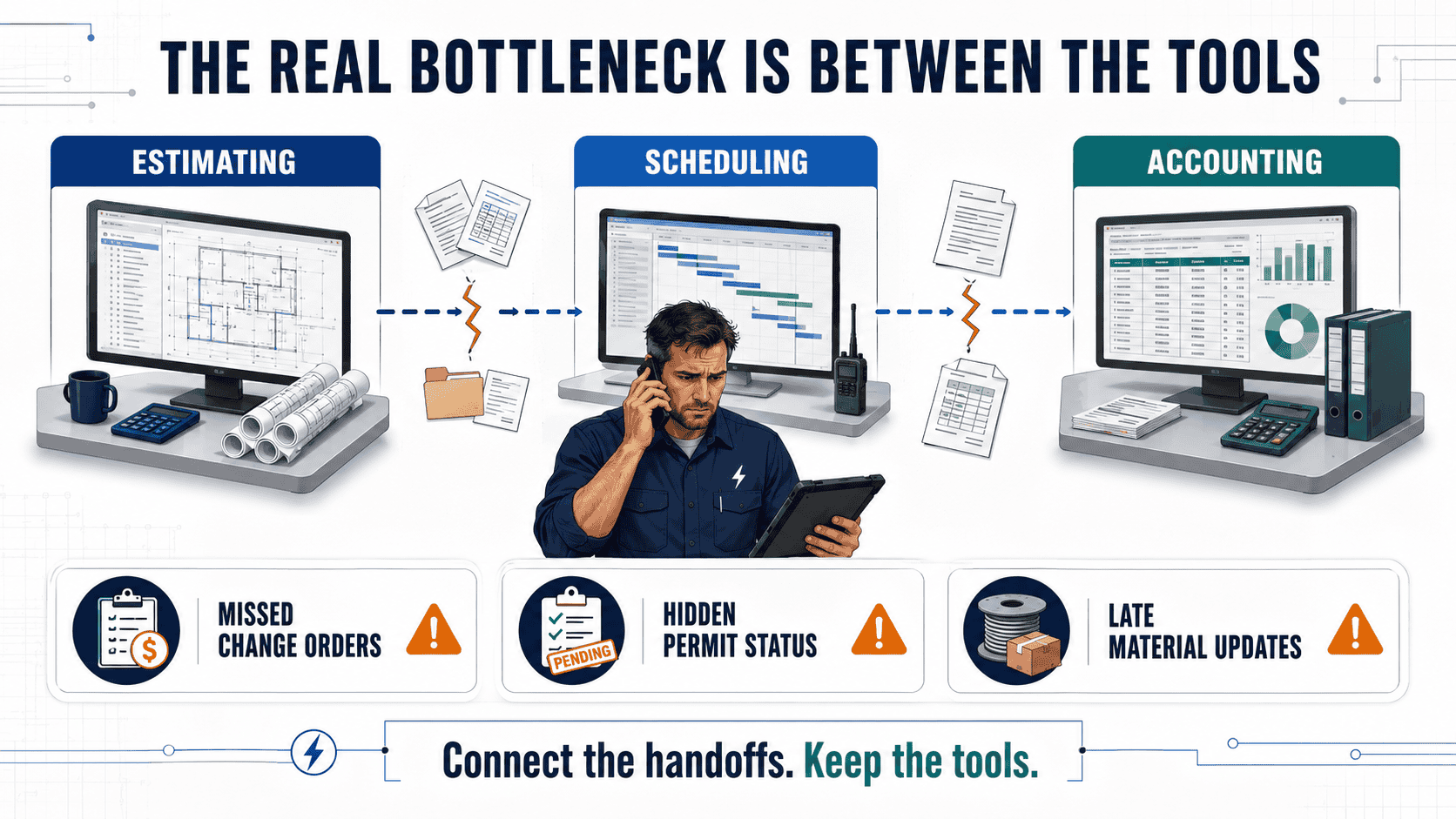
“Electrical contractor software” usually means an estimating tool, a scheduling tool, or a service-titan-style field app. Those solve pieces of the job. The real bottleneck is the handoff between them, the gap where a change order, a permit update, or a material delay has to pass through someone’s memory rather than a system. Closing that gap is a build, not a subscription.
Who This Is For
Electrical contracting firms doing commercial and residential work, usually with 5-60 employees, that’ve already bought at least one piece of software (QuickBooks, Housecall Pro, Knowify, or similar) and are still relying on a person to hold the whole job together in their head.
In This Article
The Software You Already Bought Isn’t the Problem
Walk into most electrical contracting offices, and you’ll find a stack of tools that each do their job well. Estimating software builds a clean bid. A field service app schedules the crew and tracks time on-site. QuickBooks handles the books. None of that is broken.
What’s broken is what happens between those tools, the moment a job moves from “quoted” to “in progress” to “let’s add a change order for the panel upgrade the customer just asked for.” That moment doesn’t live in any piece of software. It lives in a phone call, a text thread, or a sticky note on someone’s monitor. And whoever is holding that information becomes the bottleneck, whether it’s the office manager, the ops lead, or the owner themselves at 8 pm.
Buying another tool to sit next to the other tools doesn’t fix that. It just adds one more login and one more place where information can get stuck.
Related: our electrician CRM setup and CRM automation go further on this. See also field service automation for the wider work between jobs.
Where the Real Bottleneck Actually Lives
For most electrical contractors, the gap shows up in the same three places, job after job:
- Change orders that never make it into the invoice. A technician verbally agrees to add three outlets on-site. It gets billed two months later, if it gets billed at all.
- Permit and inspection status that lives in one person’s inbox. Nobody else can answer “Are we cleared to close this job out?” without tracking that person down.
- Material delays that don’t reach the crew until they’re standing at the panel with no parts. The supplier updated the order status. Nobody moved that update to the schedule.
This is the same gap we walked through in our piece on estimating automation and lost margin, the margin doesn’t disappear at the bid. It disappears in the handoffs after the bid is won.
Housecall Pro, Knowify, and the Rest: What They’re Built For
Tools like Housecall Pro and Knowify are genuinely good at what they’re built for. It’s worth being specific about that rather than dismissing them, because the mismatch is about scope, not quality.
| Tool Category | What It’s Built To Do | What It Doesn’t Cover |
|---|---|---|
| Field service platforms (e.g. Housecall Pro) | Scheduling, dispatch, invoicing, basic CRM for residential-leaning service work | Complex commercial job costing, multi-phase change orders, custom permit workflows |
| Construction management tools (e.g. Knowify) | Job costing, budgeting, progress billing for project-based contractors | Real-time field communication, automatic handoff between office and crew |
| Estimating software | Fast, accurate bid assembly from a parts/labor database | What happens to that estimate once the job actually starts changing |
| An AI operations partner | Connects whatever tools you already run and automates the specific handoff that’s breaking | Nothing generic, it’s built around your actual workflow, not a template |
None of the SaaS options in that table is a wrong purchase. They’re just each one piece of the job. The question worth asking isn’t “which tool should we switch to”, it’s “who or what is responsible for the space between the tools we already have.”
What Actually Closes the Gap
Closing that gap isn’t a matter of finding the right app. It’s a matter of someone sitting down with how your specific jobs actually flow, where the change order gets verbally agreed to, where the permit status lives, where the crew finds out about a material delay, and building the missing connective piece. That’s the work RevUp Now AI does.
Map exactly where your jobs stall, the specific point where a call, a text, or a memory has to fill in for a system.
Design the automation around that specific gap, for one contractor, that might be change-order capture, for another, it’s permit-status alerts.
Connect it into the estimating, scheduling, and accounting tools you already use, nobody has to switch platforms.
Keep it running and adjust it as your job mix, crew size, or supplier relationships change.
Automating the change-order handoff is one example of what that build could look like, for a different electrical contractor, the highest-cost gap might be permit tracking, or getting material delays to the field before a crew shows up short. The point isn’t the specific workflow. It’s that someone maps your actual bottleneck before anything gets built, instead of selling you a fixed feature set and hoping it fits.
“Isn’t This Just Another AI Tool?”
Fair question, given how much noise is out there right now. Here’s what actually separates this from the tools already on your desk.
Myth: “It’s a chatbot or app you have to configure.”
There’s no dashboard to learn and no prompts to write. We build the automation, connect it to your existing tools, and run it, your team keeps working the way they already do.
Myth: “It replaces the software we already bought.”
It doesn’t. It connects to Housecall Pro, Knowify, QuickBooks, or whatever you’re already running, and automates the specific handoff between them that’s currently manual.
Myth: “It’s a subscription that gets sold once and forgotten.”
We build it, implement it, and stay on to manage and improve it every month, flat retainer, month-to-month, no lock-in contract.
Myth: “This only works for huge contractors with an IT department.”
Most of the electrical contractors we build for don’t have an IT department. That’s the point, we take on the technical part so nobody on your team has to.
Field service automation
The work between jobs, from lead intake to invoicing, is covered in our field service automation guide.
Related RevUp Now AI Resources
Estimating Software vs. Automated Estimating
Getting Started with AI for Your Trade Business
Electrician Answering Service
See Where Your Jobs Are Actually Stalling
A 20-minute conversation is usually enough to spot the specific handoff costing you the most time, change orders, permits, material delays, or something else entirely.
Frequently Asked Questions
What’s the difference between electrical contractor software and what RevUp Now AI builds?
Software like Housecall Pro or Knowify handles one piece of the job, scheduling, job costing, or invoicing. RevUp Now AI doesn’t sell a piece of software; it builds the automation that connects the tools you already use, and closes the specific gap, then manages it going forward.
Do we have to replace our current software to work with RevUp Now AI?
No. The build connects to what you already run. Replacing existing tools isn’t the goal, closing the manual handoff between them is.
How long does it take to see something live?
Most builds are live within about 30 days of the initial consult, depending on how many systems need to be connected.
What does this cost?
Pricing is a flat build fee plus a flat monthly retainer, no per-seat pricing, no usage tiers, no long-term contract required.
We’re a small electrical contractor. Is this overkill for us?
The contractors who benefit most are usually the ones without a dedicated ops team, because the person currently holding all that information together is doing it on top of their regular job.