

Construction Change Order Automation: What Change Order Software Doesn’t Fix
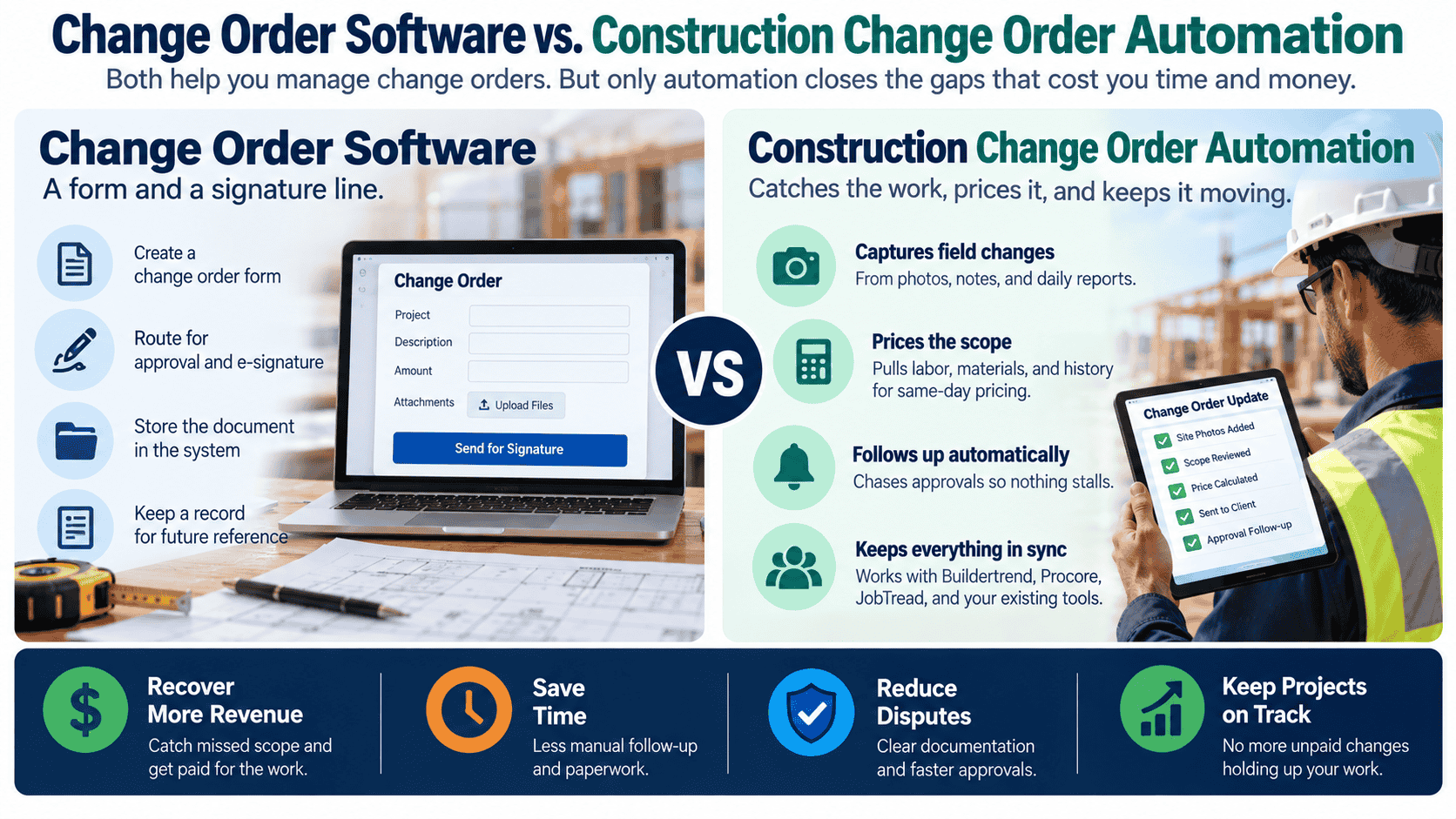
Change order software gives you a form and a place to store it. It doesn’t catch the change while the crew’s still on site, turn a voice note into a priced scope the same day, or chase the owner’s signature before the next trade shows up. Here’s what actually closes that gap, and what should stay with your PM.
Quick Answer
Construction change order automation uses an AI-driven system, not just a form template, to convert field voice notes and photos into scoped, priced change orders the same day, route them for e-signature, and follow up on quiet approvals, all inside the project management software you already use. It’s built around wherever your crew is actually losing paid work, not a generic bundle of AI agents.
Who This Guide Is For
- GCs and specialty contractors eating undocumented changes
- PMs and supers juggling field paperwork and approvals
- Firms evaluating change order or project management software
- Teams that rebuild progress billing from memory every month
Key Takeaways
Voice notes become scoped, priced change orders, your rate book and markup rules still set the price.
Owner disputes, contract interpretation, and final sign-off on major cost changes stay human.
The system connects to Buildertrend, Procore, JobTread, and QuickBooks instead of replacing them.
Whether it’s field documentation, signature chasing, or billing reconstruction determines what gets built first.
A sub tells the super mid-morning that the wall isn’t load-bearing the way the drawings show it, it’s going to take an extra day and different bracing. The super notes it, tells the owner verbally, and the crew keeps moving. Three weeks later, at the walkthrough, the owner says nobody approved that. Now it’s a conversation about who eats the cost, not a signed change order.
That’s not a template problem. A blank change order form was sitting in the project folder the whole time. It’s a capture-and-follow-through problem, and it’s why GCs with a perfectly good project management platform still write off paid work every month.
What Change Order Software Actually Gives You
Search “construction change order software” and you’ll land on Clearstory, Siteline, Buildertrend, Procore, or a free AIA form template. They’re useful, and at minimum you should have a template. They give you:
- A standard form and numbering system
- A place to log scope, cost, and time impact
- Status tracking from drafted to approved
- A record for the project file if a dispute comes up later
What they don’t do is catch the change while the crew is still on site, turn a scribbled field note into priced, signed paperwork the same day, or nudge an owner who’s gone quiet on approving it. That work still depends on whoever’s fielding calls between running the job.
The Part Software Was Never Built to Solve
Every GC who’s looked at construction change order software runs into the same wall: the tool is a filing system, not a capture system. Four gaps show up over and over.
Field changes get remembered, not documented. Supers are running the job, not typing up scope changes, verbal agreements are easy to forget and easier to dispute later.
Pricing takes days because someone has to retype it. Voice notes and photos sit until someone has time to convert them into a priced, formatted change order, by which point the crew has already moved to the next phase.
Signatures stall in someone’s inbox. An unsigned change order isn’t a change order, it’s an unpaid favor, and owners are in no rush to sign something that costs them money.
Progress billing gets rebuilt from memory. Without a running record of approved changes, billing day turns into reconstructing the month from texts and job-site photos.
- Pricing and markup decisions on complex scope changes
- Owner relationship management and dispute negotiation
- Contract interpretation questions
- Final sign-off on major cost changes
The Other Fix Crews Try: Hire More, or Rely on Built-In Forms
Most crews solve this one of two ways before they solve it for good.
Hire a full-time PM or admin to chase paperwork. It works until job volume outpaces one person’s ability to be on every site and in every inbox at once.
Rely on the project management software’s built-in forms. Better than nothing, but a form still needs someone to fill it out, price it, and chase the signature, the software doesn’t do any of that on its own.
Both fixes patch the symptom. Neither one closes the loop from field change to signed, paid paperwork.
What an AI Operations Partner Does Instead
A change order template gives you a form. A project management platform gives you a place to store it. An AI operations partner captures the change in the field, prices it against your rate book, and drives it to signature, inside the software you already use. RevUp Now AI doesn’t ask a crew to switch platforms; the system sits on top of Buildertrend, Procore, JobTread, or QuickBooks.
| Change Order Template/Form | Project Management Software | AI Operations Partner | |
|---|---|---|---|
| Captures field changes from voice notes/photos | No | Manual entry | Yes |
| Prices using your rate book and markup rules | No | No | Yes |
| Routes for e-signature same day | No | Sometimes | Yes |
| Chases quiet approvals automatically | No | No | Yes |
| Files daily logs and site photos automatically | No | Manual upload | Yes |
| Works inside your existing PM software | N/A | N/A | Yes |
| Requires staff to operate day-to-day | Yes | Yes | No |
One caveat worth being direct about: the voice-note-to-proposal piece is one part of this, not the whole thing. Some crews need field capture most, changes are happening and nobody’s writing them down. Others have that under control but bleed money on signature chasing, or lose hours every month rebuilding progress billing. The build reflects wherever the money’s actually leaking.
How RevUp Now AI Builds the System
Consult
A working session on where changes go undocumented or unpaid, field capture, signature chasing, or billing reconstruction.
Build
The system is built around your rate book, markup rules, and escalation rules, connected to Buildertrend, Procore, JobTread, or QuickBooks.
Implement
A supervised go-live, usually starting with one crew or job type, with test runs reviewed before full rollout.
Maintain
Ongoing monitoring on a flat monthly retainer, adjusting pricing rules and catching the next bottleneck.
Pricing is flat: one build fee, one monthly retainer, no per-order metering, and no contract lock-in. Most crews have something live in about 30 days. Learn more about the broader RevUp Now AI process.
Change Order Checklist: What to Capture Before the Crew Moves On
Whether a person or a system is running capture, every field change, before the crew moves to the next phase, should include:
- Scope description: exactly what’s changing and why
- Trigger: what caused it, field condition, owner request, or code requirement
- Cost impact: labor, material, equipment, and markup
- Time impact: any schedule delay this creates
- Photos or documentation: before/after or field condition proof
- Approval status: who needs to sign, and by when
- Linked trade or sub: which crew or subcontractor the change affects
A missing item here isn’t just a paperwork gap, it’s usually the reason a change gets disputed at the walkthrough instead of paid on the next draw.
Common Myths About Change Order Automation
Myth: AI sets your prices
Not in this model. Pricing follows your rate book and markup rules, you set the rules, the system applies them.
Myth: You have to switch project management software
The system is built to integrate with Buildertrend, Procore, JobTread, and QuickBooks.
Myth: Owners won’t sign something from an automated system
They’re signing your paperwork, priced by your rules, the delivery speed is what they notice, not the process behind it.
Myth: Only large GCs benefit
Fit is about whether changes go undocumented or unpaid, not company size.
Related RevUp Now AI Resources
Ready to Stop Eating the Cost of “That Wasn’t in the Bid”?
See how RevUp Now AI can capture field changes, price them against your rate book, and drive them to signature, inside the project management software you already use.
Talk With RevUp Now AIFrequently Asked Questions
Does this replace our project management software?
No. It’s built to integrate with Buildertrend, Procore, JobTread, and QuickBooks, and pushes change order data into your existing project file.
How does pricing work, will it use our rates?
Yes. The system is built around your specific rate book and markup rules, not a generic cost estimate.
What about complex scope disputes?
Those route to your PM or owner for judgment. The system handles capture, pricing, and routing, not negotiation.
Will owners know it’s AI?
It discloses if asked directly. In practice, owners tend to notice how fast and professional the paperwork is, not what produced it.
What happens to field photos and data?
They route straight into your existing project management system, encrypted, with no manual re-entry step.
We’re a small crew, is this overkill?
If change orders have ever gone undocumented or unpaid because nobody had time to write them up, the fit is about that gap, not company size.